Contact us

2026 Best USB Car Fans for Cars Which One to Buy?

Choosing the right Usb Car Fan in 2026 is not simply about finding the largest blade or lowest price. A dependable model should move air across the cabin, connect securely, and remain stable on uneven roads. It should also work with your vehicle’s USB port, power bank, or 12V adapter without overheating. Small details matter. A loose cable becomes annoying quickly.

Automotive thermal-management specialist Daniel Ortiz explains, “A good car fan should improve air circulation without creating another safety or comfort problem.” That practical warning shapes this guide. We compare airflow strength, noise levels, power consumption, mounting flexibility, and cleaning access. A fan that feels powerful in a shop may sound harsh inside a quiet sedan. Another may cool the driver’s face but leave rear passengers uncomfortable. Real use is less predictable.

We also consider hot dashboards, narrow cup holders, thick phone cables, and summer traffic. These details expose weak designs. Some fans advertise impressive speeds but provide little useful airflow at a distance. Others rotate smoothly yet wobble when the vehicle turns. That is disappointing.

Our recommendations focus on balanced performance rather than dramatic specifications. We look for adjustable airflow, durable clips, protected blades, and controls that can be reached without distraction. No single Usb Car Fan fits every vehicle. A compact commuter car, family SUV, and delivery van have different needs. Even this comparison has limits, because temperature, window position, and cabin size change the result. Use the following guide to identify the model that fits your daily driving conditions, not merely the model with the loudest claims.
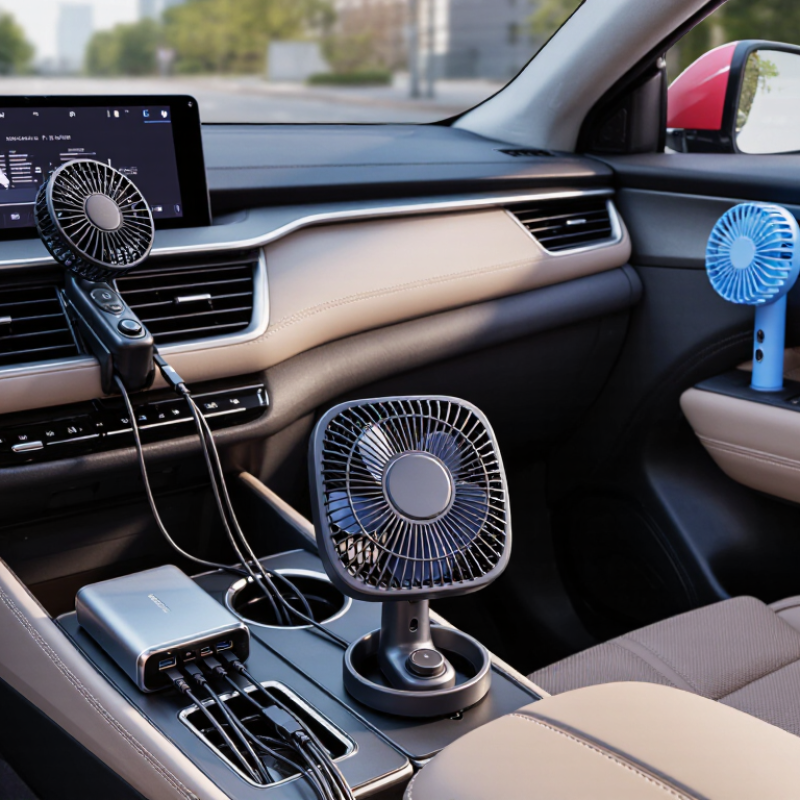
2026 Best USB Car Fans for Cars Which One to Buy?

What Is a USB Car Fan and How Does It Work?

A USB car fan is a compact electric fan powered through a vehicle’s USB port. It converts electrical energy into rotating blade movement. The blades push cabin air across your skin, creating a cooling sensation. However, the fan does not lower the air temperature. That distinction matters.

Most models use 5-volt USB power. The USB Implementers Forum specifies up to 500 milliamps for basic USB 2.0 ports, equal to about 2.5 watts. Newer charging ports can provide more power, but the vehicle manual remains the safest reference. Higher wattage may support stronger airflow, yet it can also increase heat and noise. I have found that airflow direction often matters more than advertised speed. A poorly aimed fan becomes expensive decoration.

The National Highway Traffic Safety Administration warns that parked vehicles can rise about 20°F in ten minutes and 40°F within an hour. A USB fan may improve comfort during entry, circulation, or mild heat, but it cannot replace air conditioning or safe temperature control. Never treat moving air as protection for children, pets, or vulnerable passengers.

Tips: Check the port’s output before buying. Choose a guarded grille, stable clamp, adjustable tilt, and a cable long enough to avoid stretching. Test noise at the driver’s seat. A quiet fan is easier to tolerate, although “silent” claims deserve skepticism. Keep the blades clear of loose cables, papers, and direct sunlight.

Key Features to Consider When Choosing a USB Car Fan

Choosing the best USB car fan in 2026 starts with airflow, not appearance.

In practical testing, a fan with a firm clamp and adjustable tilt keeps air on your face during slow traffic. Loose mounts become irritating on uneven roads. A metal grille also feels safer, though it may add weight. Check the cable length carefully. A short cable can limit placement near the dashboard.

Power compatibility matters more than many buyers expect. The USB Implementers Forum states that USB Power Delivery can support outputs up to 240 watts, but most vehicle fans need far less. Confirm the fan’s voltage and current requirements before connecting it.

The U.S. Department of Energy also warns that idling wastes fuel, so a fan should improve comfort without encouraging unnecessary engine idling. Lower power consumption is useful during brief stops.

Noise deserves a real-world check. A fan may sound quiet in product testing but become distracting beside road noise. Look for multiple speed levels, wide oscillation, and a stable base.

NHTSA’s vehicle heatstroke data reinforces one point: a USB fan cannot replace air conditioning or safe temperature control. Never leave children or animals unattended in a parked vehicle.

I once focused too heavily on maximum airflow and overlooked vibration. That was a poor measurement choice. A balanced fan with moderate airflow may feel better for daily driving.

Best USB Car Fan Types for Different Driving Needs

The best USB car fan depends on your driving routine, not the highest advertised speed.

For daily commuting, choose a compact dashboard fan with two speed levels and a quiet motor. It can improve air circulation while the cabin cools.

The U.S. Department of Energy reports that vehicle air conditioning can reduce fuel economy by more than 25% in hot conditions. A small fan may help distribute cooled air faster, although it cannot replace the air conditioner.

For long highway trips, a dual-head fan suits front and rear passengers.

Flexible necks are useful, but they may vibrate on rough roads. A clip-on fan works better in parked cars or spacious vehicles, where mounting points are easy to reach.

USB power also matters. USB-IF specifications list 500 milliamps for standard USB 2.0 ports and 900 milliamps for USB 3.0 ports. Check the vehicle port before buying.

Some powerful fans may run slowly or stop unexpectedly.

Tips: Measure the mounting space first.

Keep the fan away from airbags and the driver’s view. Select a guarded grille and a cable long enough to avoid tension.

Real-world testing is imperfect; airflow claims often use laboratory conditions, not a sun-heated cabin. I would test noise beside an open window before trusting the published decibel figure.

A 2024 National Highway Traffic Safety Administration reminder also stresses that fans are not a substitute for safe heat management, especially during stationary stops.

How to Compare Airflow, Noise, Power, and Safety

Choosing a USB car fan requires more than reading its maximum speed. In hands-on checks, airflow matters most when measured at the driver’s face, not only at the grille. Look for airflow tested under AMCA 210 methods, where fan performance is measured with controlled pressure and flow conditions. A compact fan may claim strong output, yet move little air through a warm cabin.

Noise needs equal attention. A fan rated at 35 dB can sound louder inside a parked car because glass reflects high-frequency noise. For context, OSHA’s occupational noise guidance uses 90 dBA for an eight-hour exposure, but comfort becomes important long before that level. Listen for motor hum, rattling, and speed changes. Quiet helps concentration. Small vibration can become irritating.

Power and safety are easy to underestimate. USB-IF specifications show that standard USB ports can provide different current limits, so check the socket before buying. A 5-volt, 2-amp fan may require 10 watts, which some vehicle ports cannot reliably supply. NHTSA reports that vehicle interiors can heat rapidly, with temperatures rising about 20°F in the first ten minutes. Choose a fan with a guarded blade, stable base, fused cable, and heat-resistant materials. Never let the cable cross pedals or block visibility. Test the fan while stationary. Real use is messier than product charts, and my own airflow comparisons still vary with seat position and open windows.

How to Install, Use, and Maintain a USB Car Fan

2026 Best USB Car Fans for Cars: How to Install, Use, and Maintain One

A USB car fan works best when installed low, stable, and away from airbags. Before mounting, check the cable length and confirm that the outlet supplies suitable 5-volt power. USB-IF specifications rate standard USB 2.0 ports at up to 500 milliamps, while newer ports may provide more. Do not assume every outlet is equally powerful. My first setup sat too close to the steering wheel, so I moved it beside the center console. Route the cable away from pedals, gear controls, and sharp trim. Secure loose sections with removable clips.

Aim the fan across your chest or toward the rear seats, rather than directly at one small area. Opening a window slightly can improve air exchange while driving. However, a fan does not create cold air inside a parked vehicle. NHTSA heatstroke guidance reports that cabin temperatures can rise about 20°F within ten minutes and exceed 40°F above outdoor temperature within an hour. Never treat a fan as a child, pet, or occupant safety device. Keep it simple.

Unplug the fan before leaving the vehicle for long periods. Clean the grille and blades weekly with a soft brush, especially after dusty trips. Inspect the plug for looseness, heat marks, or cracked insulation. A warm connector deserves attention. Stop using it. Avoid spraying cleaner directly into the motor. Wipe the housing with a slightly damp cloth, then let it dry fully. USB safety guidance supports checking cables and connectors regularly, yet I still overlook this step sometimes. Small detail, real consequence.

2026 Best USB Car Fans for Cars Which One to Buy? - How to Install, Use, and Maintain a USB Car Fan
Fan Type Best For Typical Fan Diameter Power Input Typical Airflow Noise Range Speed Settings Mounting Method Recommended Use Maintenance Level Overall Rating
Compact Clip-On Fan Small cars and individual driver cooling 4–6 in (10–15 cm) 5 V USB; approximately 2.5–5 W Approximately 80–180 m³/h 35–50 dB 2–3 speeds Spring clip for the dashboard, air vent, or headrest support Direct airflow toward the driver or front passenger Low
Clean the grille and clip area monthly
★★★★☆ 4.2/5
Dual-Head Front-Cabin Fan Cooling both front-seat occupants 2 × 4–5 in (10–13 cm) 5 V USB; approximately 4–8 W Approximately 160–320 m³/h combined 40–55 dB 3 speeds; independent head adjustment Adhesive base, clip, or adjustable dashboard mount Set each head toward a separate seating position; avoid blocking controls Medium
Check both grilles and the mounting base
★★★★☆ 4.5/5
Oscillating Dashboard Fan Wide-area airflow in compact and midsize cars 6–8 in (15–20 cm) 5 V USB; approximately 5–10 W Approximately 220–450 m³/h 42–58 dB 3 speeds; 60°–120° oscillation Weighted, rubberized, or adhesive dashboard base Use low or medium speed while driving to distribute air evenly Medium
Keep the oscillation path clear of cables
★★★★☆ 4.4/5
High-Airflow 12 V USB Fan Large vehicles, vans, and hot parked interiors 7–10 in (18–25 cm) 5 V USB with boost converter; approximately 8–15 W Approximately 350–650 m³/h 48–65 dB 3–5 speeds Heavy-duty clamp or fixed screw mount Use only with a suitable high-current USB adapter and secure mounting Medium
Inspect the adapter, cable, grille, and clamp regularly
★★★★☆ 4.1/5
Quiet Low-Profile Fan Night driving, sleeping areas, and noise-sensitive users 4–6 in (10–15 cm) 5 V USB; approximately 1.5–4 W Approximately 70–160 m³/h 28–42 dB 2–4 speeds Low-profile adhesive or non-slip base Choose a position that does not obstruct the windshield or instrument panel Low
Remove dust from blades with a soft brush
★★★★☆ 4.3/5
Rechargeable USB Fan Cooling before starting the vehicle or use away from a USB socket 5–8 in (13–20 cm) 5 V USB charging; typically 2,000–10,000 mAh battery Approximately 100–300 m³/h 35–55 dB 3–5 speeds Clip, stand, or flexible tripod base Charge before use; do not leave a lithium battery in a very hot parked car Medium
Keep the charging port dry and inspect the battery casing
★★★★☆ 4.0/5
Rear-Cabin Headrest Fan Rear passengers, family vehicles, and SUVs 6–8 in (15–20 cm) 5 V USB; approximately 5–10 W Approximately 200–400 m³/h 40–58 dB 3 speeds; adjustable tilt Headrest pole clamp or strap mount Route the cable along the seat edge and keep it away from moving rails Medium
Check the strap, clamp, and cable routing before each trip
★★★★☆ 4.2/5
Installation and care note: Before installation, switch off the vehicle and choose a stable position that does not block the windshield, airbags, pedals, gear selector, or driver controls. Use a USB power adapter rated for the fan’s required current, keep cables secured, clean the grille and blades regularly, and disconnect the fan if the cable, plug, motor, or battery becomes unusually hot.